
Real-time conversation and peer learning for your online programs
Design once, facilitate with AI and see the learning process, not just the score
Oral exams, role plays, debates, defenses, interview practice, guided reflection — the conversations that have always needed a human facilitator in the room. human2human.ai runs them with AI facilitation for every learner, whenever each of them is ready, inside Moodle, Open edX, Canvas, or wherever your courses live.
The problem
Two things you're probably dealing with
You compete on how good the online learning experience is
Your program is judged against high standards — sometimes by a client, sometimes by a learner deciding whether to enroll. It has to be as good as an in-person alternative, or better. And the formats that would make it undeniable are the ones you can't staff.
You have to show what people actually learned
To the client who paid, to the funder, to yourself. Completion rates and a satisfaction score don't answer it. What you need is what learners actually said, thought, and got wrong — across the whole cohort, not a sample.
The learning that works doesn't scale. What scales no longer proves anything.
Here's what changes with human2human.ai
An AI facilitator runs the conversation with every learner or small group, and makes visible what used to happen only in the room.
You write the activity once
The situation your learners will be put in and the context around it. What they should come away able to do. How the time is spent. Who the facilitator is — their role in the scenario and how they behave. What they must not do. And what a strong answer sounds like next to a weak one, which is how every learner gets assessed.
The platform helps you write all of it, and you can start from the template library rather than a blank page. Attach your own materials so the facilitator knows your content, your terminology, your standards.
No engineering. No course to redesign around it. A program lead can do this alone; a learning designer will do it faster and better.
Three ways to get it to your learners
Share a link. Anywhere — email, WhatsApp, your course page. Fastest way to run something today.
Embed it in any website. Your own platform, your portal, wherever your learners already go.
Connect it to your LMS. Moodle, Open edX, Canvas, or anything that supports LTI — the standard way learning tools plug into a course. This is the one worth doing: learners open the activity from inside the course they’re already in, with no separate sign-in, and their grades come back to your gradebook automatically. It’s a one-time setup.
Then you decide when it’s open. Solo activities get a window — open from this date to that one, so it doesn’t drift to the bottom of everyone’s list. Group sessions get time slots: learners book the one that suits them, get a calendar invite and a reminder, and can rebook if something comes up. You aren’t chasing anyone.
Nothing to install. No migration. No course to rebuild.
The learner opens it and starts talking
Before they join, they see what the activity is for, how long it takes, and the rubric they’ll be assessed against. Nothing is hidden and nothing is a trick — the standard is on the table before they begin.
Then they join, and the facilitator greets them and gets going. They speak; it speaks back. A countdown runs, the transcript builds as they go, and the rubric stays one click away if they want to check what they’re being asked for.
It listens, asks the follow-up their answer invites, and pushes when something is thin — so no two learners have the same conversation.
“I’d tell her the quality has dropped and she needs to fix it.”
“She says she’s been covering for a colleague on leave and didn’t think anyone noticed. What now?”
In a group session, everyone joins on camera and can see each other. They talk to each other, not to a machine — and the facilitator comes in when the group needs it: to bring in someone who’s gone quiet, to move things on, to press on something worth pressing on.
The moment it ends, both directions
The learner is asked how the activity went for them — what worked, what didn’t. That comes straight back to you, and it’s how you find out whether an activity is landing before you’ve run it with three hundred people.
And they get their own response, immediately. Where they landed against each criterion in your rubric, and why — written from what they actually said in the conversation, not a generic paragraph. What they reasoned well, where they were thin, what to go back to.
There’s a score too, which matters when the activity counts for something.
This is the moment it’s worth having. Not two weeks later, when they’ve moved on and stopped caring what they got.

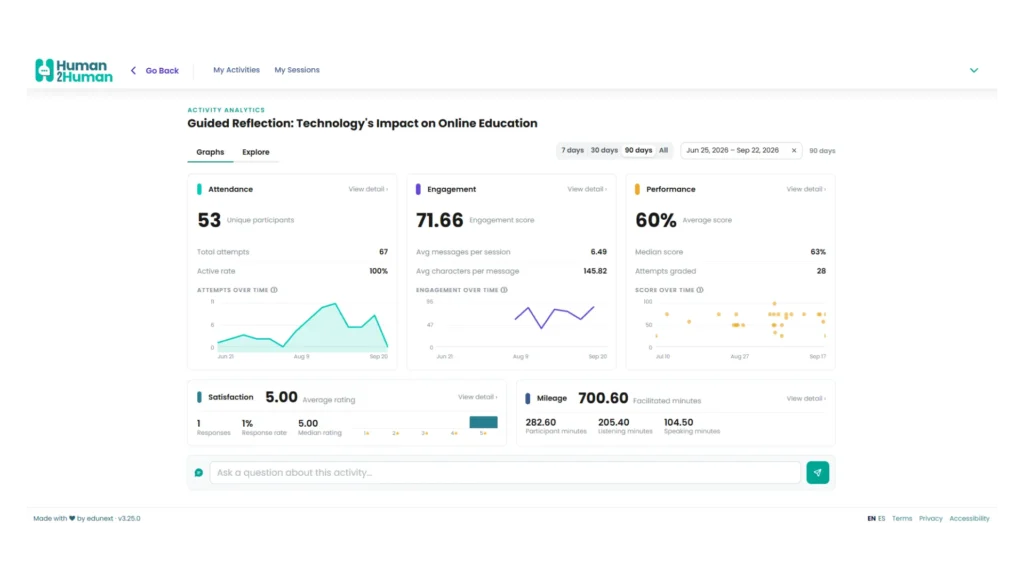
Everything that happened, and a way to make sense of it
Who started and who finished. How long each of them stayed and how much they actually engaged. What they scored, criterion by criterion, and how the cohort performed as a whole. Whether they liked it. How many learners took part, how many came back, and how many minutes it used.
Then the part that isn’t a dashboard. Every conversation is transcribed, and you can ask a question across all of them at once — what did this cohort not understand about pricing?, who challenged the premise and who accepted it? — and get an answer built from what learners actually said, not from a sample you had time to read.
That’s how you find out that 40% of them couldn’t justify the decision, or that one misunderstanding runs right through the group that nobody had ever put in writing.
Which is what you change before the next cohort — in the course, or in the activity itself. Back to step 1.
Two types of activities
Let them learn solo or in small groups
H2H REFLECT
one learner at a time
The learner opens it whenever it suits them, talks it through out loud or in writing, and the facilitator adapts to how they’re doing — easing off when they’re lost, staying on it when they’re close.
Nobody else is in the room, so they’ll admit confusion, test a bad idea, get it wrong and go again. Same for fifteen learners or fifteen hundred.
What it replaces: static written reflections & take-home essays
Example activities: Explore each format by clicking the categories below
H2H CONNECT
small group activities
Learners book a slot that works for them and join with their peers, cameras on. They talk to each other, not to a machine — the facilitator is in the call, bringing in whoever has gone quiet and pressing on what’s worth pressing on.
Real disagreement, real defending of a position, in front of people who can hear you. Same for one group or forty.
What it replaces: fragile forums & hard-to-run live sessions
Example activities: Explore each format with a buddy by clicking the categories below
What makes it different?
It runs an activity you designed, not a conversation the learner steers
A general assistant follows wherever it's taken. This follows your structure, your questions, your standard, and holds every learner to the same one. You also see all of it afterwards: every transcript, every score, the whole cohort. A custom GPT gives you none of that.
The facilitator is in the conversation, speaking
It talks, asks the next question, decides who hasn't contributed yet. Not a tool that records a session and grades the transcript afterwards.
It knows your course, and lives inside it
Connected through LTI, with your own materials attached, your content, your terminology, your standards. Learners reach it from where they already are and grades come back automatically.
Real conversation is the scarce thing now
Everything else is getting more personalized and more solitary. Learners talking to each other, having to defend a position out loud in front of people who can hear them, is becoming the part they can't get anywhere else. It's the whole reason this is called human2human.
Our track record



Frequently Asked Questions
How is this different from a custom GPT or Gem?
How accurate is the assessment, and can I check it?
Can learners fake their way through it?
Do I need an instructional designer?
Can I try it before committing to anything?
Yes. There are live activities on this site you can take right now, both solo and group, with no signup. And a free account gives you 500 facilitation minutes and an unlimited number of activities — enough to design something real, run it with a group of learners, and see what comes back before you talk to anyone.
What happens if we run out of minutes?
Organizations receive alerts as they approach their allowance. By default, activities continue past the allowance at a published rate invoiced afterwards, so learners are never cut off mid-program. Organizations that need a guaranteed ceiling — for example on a fixed government contract — can enable a hard stop instead.
How is learner data handled, and is it used to train models?
Conversations are stored and are sent to a third-party LLM provider to run the activity, and they are not used to train foundation models — ours or anyone else’s. Your institution owns the data; human2human.ai acts as processor. Data is held in AWS US East, encrypted in transit and at rest, with role-based access and tenant separation, and retained for five years by default. The full detail, including how we align with GDPR and FERPA principles, is in our privacy policy.
Is it accessible to learners with disabilities?
human2human.ai targets WCAG 2.2 AA. All primary flows work by keyboard alone, with visible focus indicators and a shortcut menu; pages use proper heading structure and labeled form fields for screen readers; and contrast meets AA. Text interaction is always available as a full alternative to voice, so learners who can’t use audio or speech participate the same way. We maintain a VPAT documenting current support and known gaps — available on request, and we’d rather you asked for it than assumed.
What languages does it support?
The interface is available in English and Spanish. The facilitator’s voice works in many more — we’ve run activities in Italian, German, French and others — and text-based activities work in more still. Quality and speech accuracy do vary by language, so it’s worth running a test with your own content before committing a cohort, and if a language you need isn’t performing well, tell us and we’ll look at adding proper support for it.
How does the LMS integration work?
Through LTI, the standard way external tools connect to a course. human2human.ai currently supports LTI 1.1, with 1.3 coming, and it’s available on every plan including the free one. Learners launch the activity from inside your Moodle, Canvas or Open edX course, and their scores pass back to your gradebook automatically. Setup is a one-time configuration.
Can we connect it to our own systems?
Talk to us. LTI covers launching activities and returning grades, which is what most organizations need. If you want to pull analytics into your own reporting, push data somewhere else, or connect through webhooks, that’s a conversation we’re open to — we just haven’t published a general API yet.
Still Have Questions? Get in Touch!
Three ways to carry on
Take an activity
Five minutes, no signup. Be the learner and see what the facilitator actually does with what you say.
Build one yourself
A free account gives you 500 facilitation minutes and as many activities as you want to make. Design something for your own program, run it with a real group, and look at what comes back.
Talk to us
If you're weighing this for a program with real learners in it, we'll go through your case, your constraints, and whether this is a fit. If it isn't, we'll say so.